PLANNINGSHARE  ·  BUILT AND RUN BY LOGIC LINE

Programmes, claims and cost for a whole portfolio — in one place

PlanningShare is the project controls and claims platform we build and run. Contractors, subcontractors and PMCs use it to hold progress, programmes, EOT claims, variations, cashflow, NOCs and correspondence in a single system — with an alert engine that raises a deadline while there is still time to act on it.

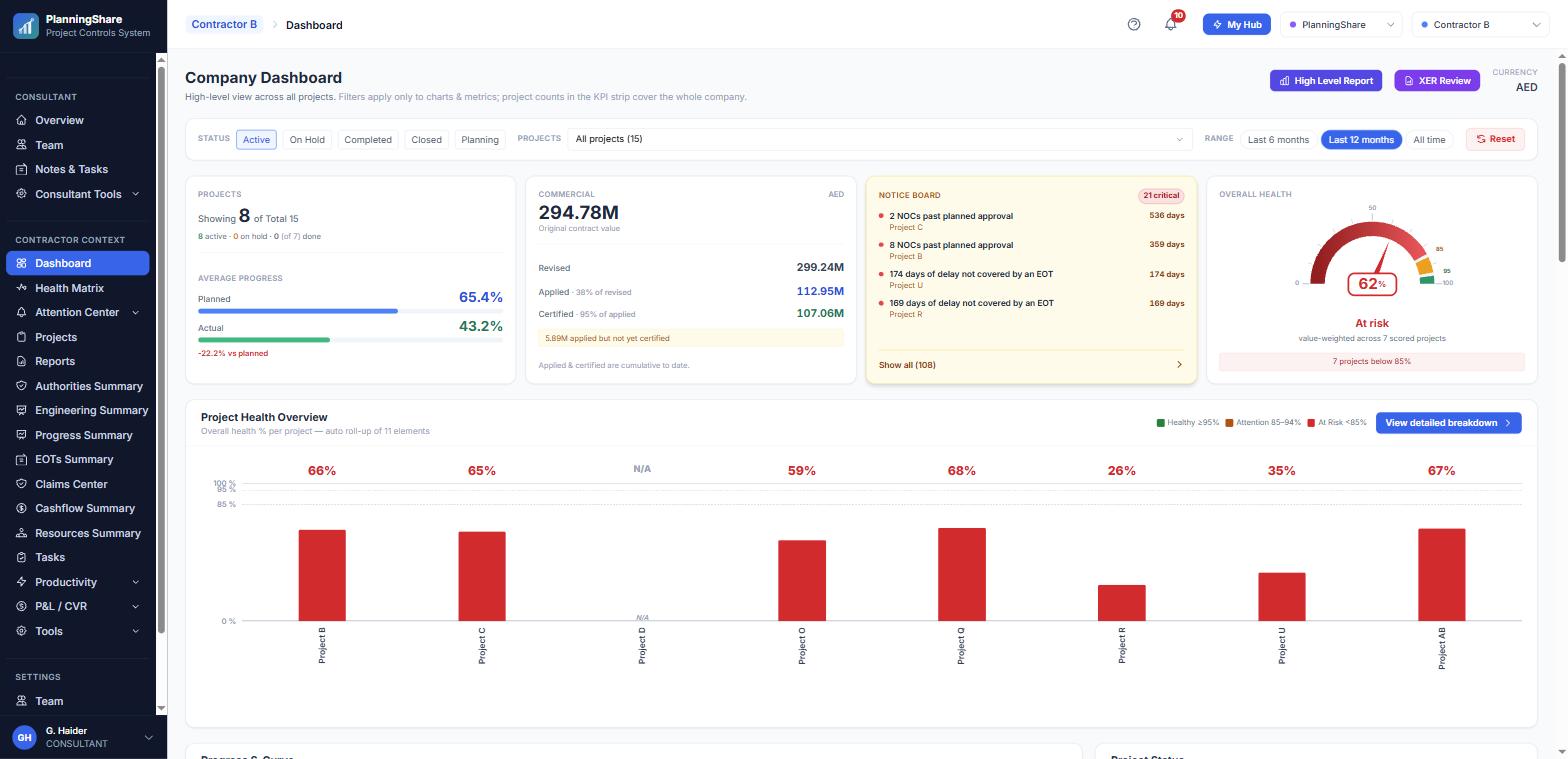
PlanningShare company dashboard — KPI strip, notice board and portfolio health

The company dashboard, live on pcs.planningshare.com. A real portfolio with client names replaced.

4

Contracting companies live on the platform

42

Projects under management

AED 1.2B

Contract value being tracked

40+

EOT claims on the register

Live figures from pcs.planningshare.com, August 2026.

WHY WE BUILT IT

The records that protect entitlement live in four different places

On a busy portfolio the risk usually surfaces only once the window has already closed.

Records in four places

The programme sits in P6, the claim in Word, the cashflow in Excel and the letters in an inbox. Nothing reconciles — and there is no audit trail when the claim is challenged.

Nobody is counting the days

A 28-day notice window closes quietly. An EOT submission waits months for a determination while no one is tracking how long it has been sitting.

Programmes that never get approved

Baselines and revisions come back marked up, or sit under review for months. The project runs on without an approved plan of record.

Head office flying blind

Nobody can see which of twenty projects is slipping until the delay — and the LD exposure that comes with it — is already locked in.

THE PART PEOPLE NOTICE FIRST

An alert engine that speaks up before the window closes

Every observation comes from a named rule and carries a criticality rank. It reaches the team four ways: on the in-app board, in the notification tray, in an 08:00 email digest, and on WhatsApp when the item is critical.

Repeats are merged so nobody gets spammed. Anything left unanswered escalates rather than simply repeating, and every alert opens the register, letter or task that raised it.
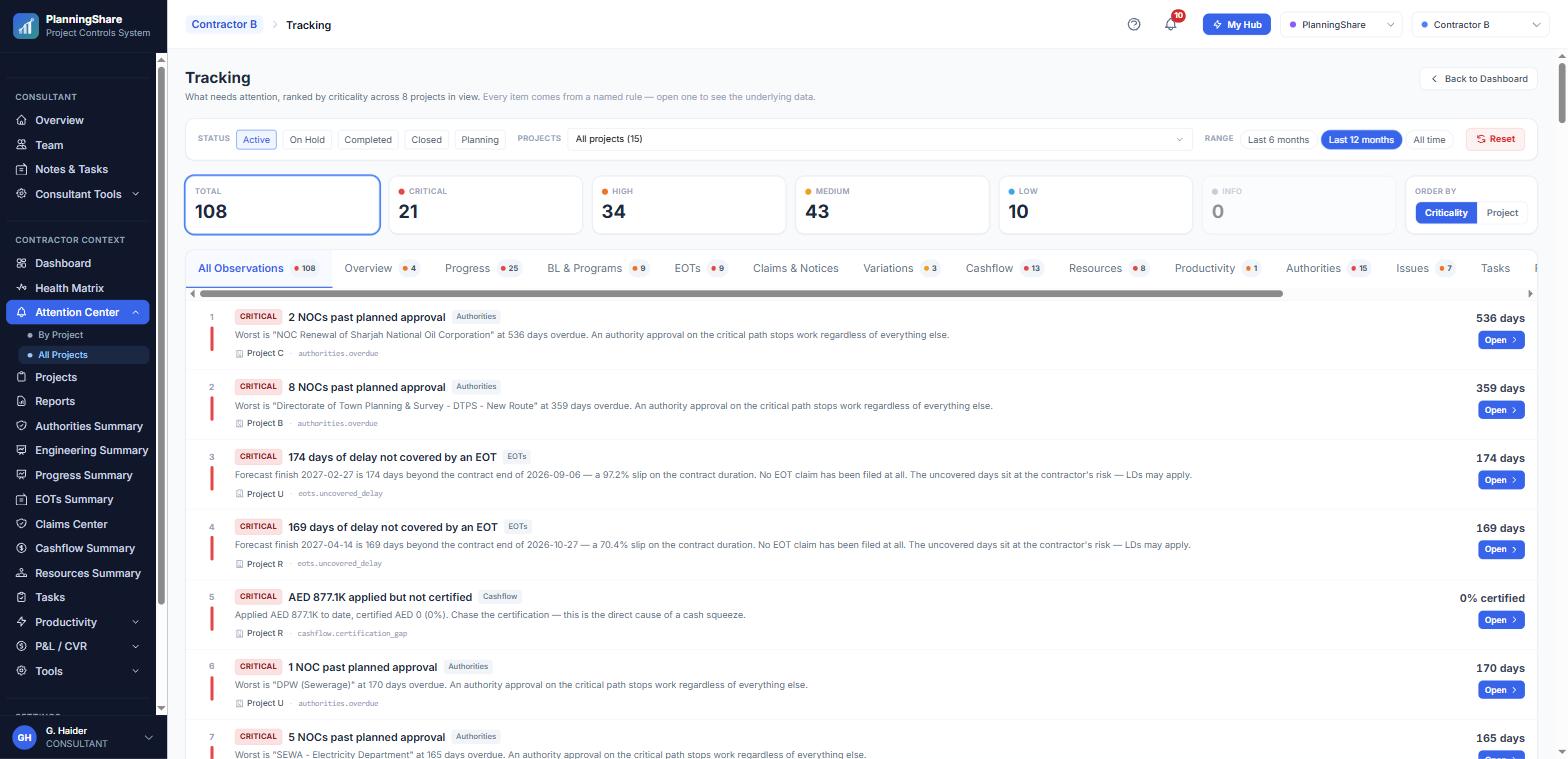
PlanningShare Attention Centre — rule-based tracking board ranked by criticality

Live: 90 observations across one contractor’s portfolio, 22 of them critical.

REAL SCREENS

Not a mockup — the system running today

Every screen below is live on pcs.planningshare.com. Client and project names have been replaced.

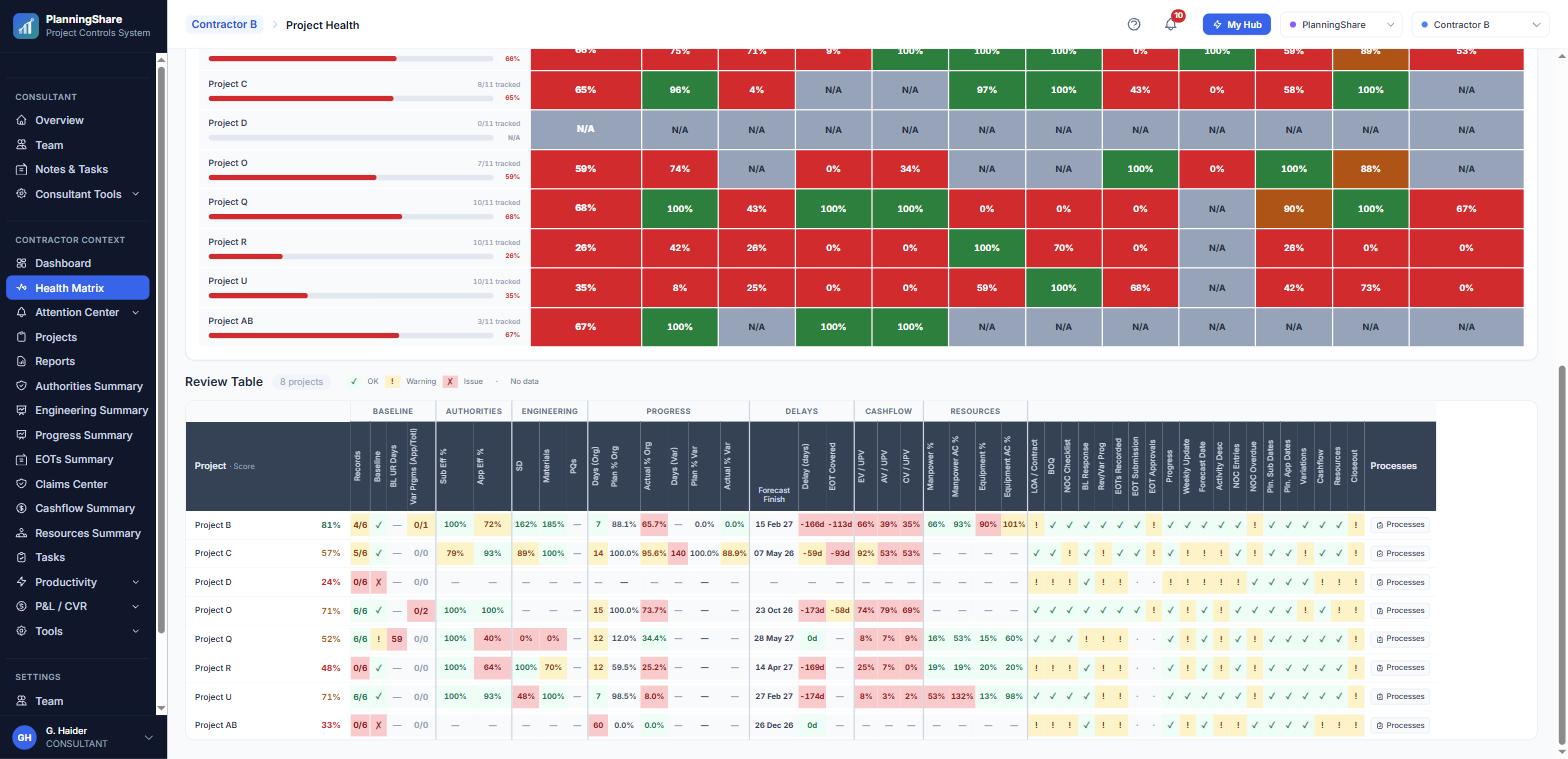
Health Alert Matrix — projects scored across baseline, authorities, engineering, progress, delays, cashflow and resources

Health Alert Matrix — every project scored across each control domain.

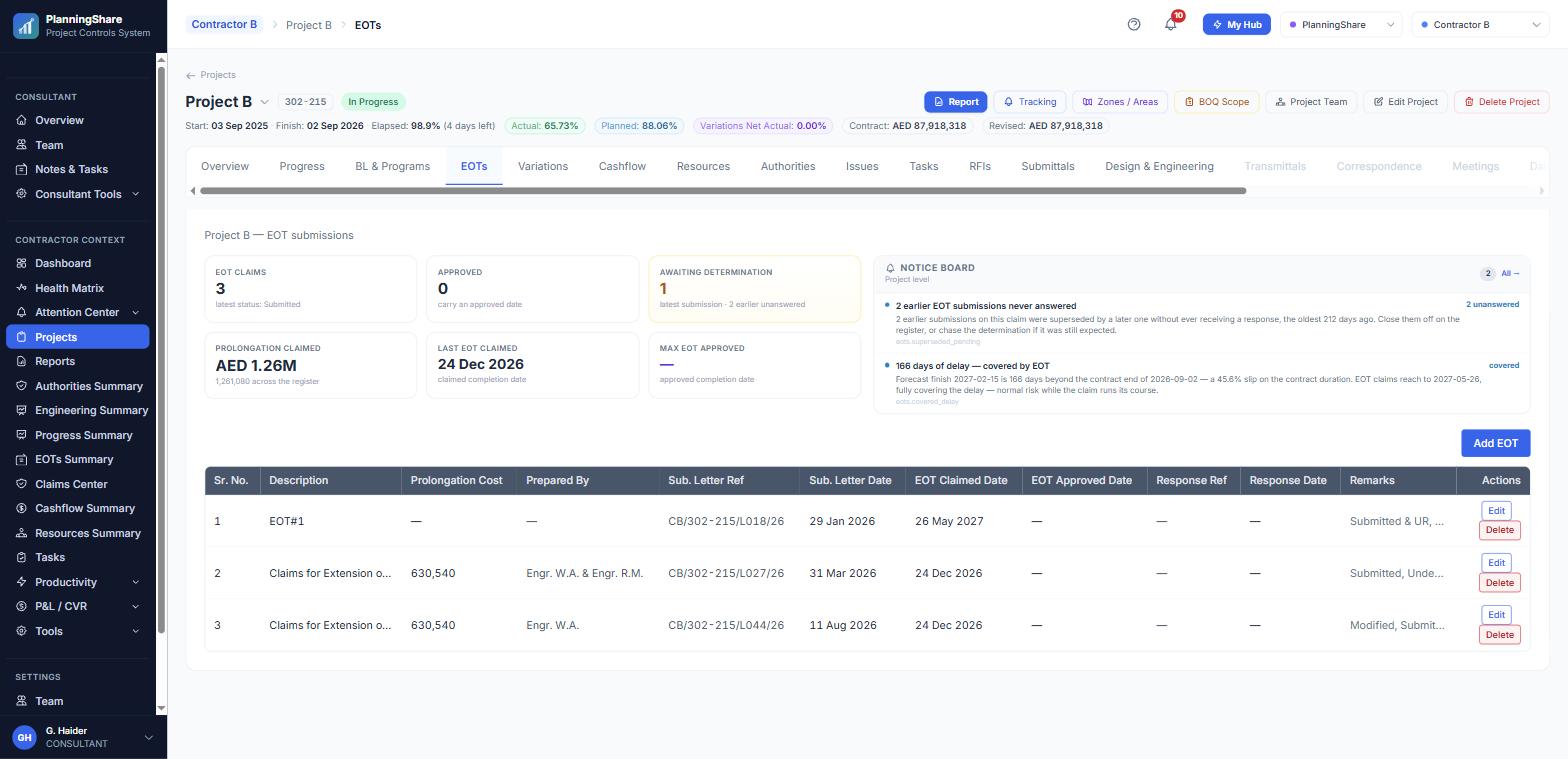
EOT submissions register with prolongation cost, letters and response tracking

EOT and delay claims — prolongation cost, letters and responses.

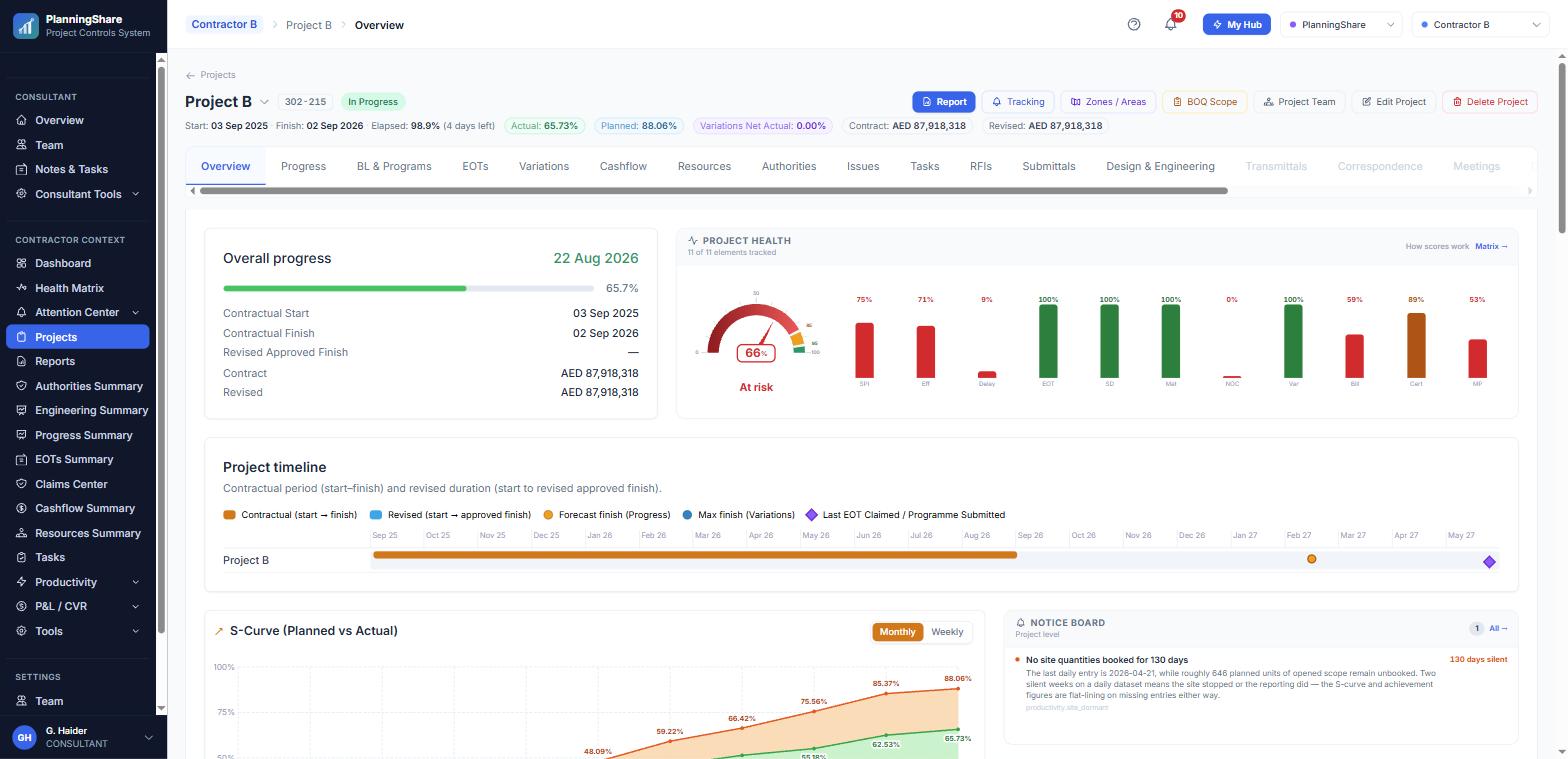
Project overview with planned vs actual S-curve and timeline

Progress and S-curves — planned against actual, per project.

Also inside: cashflow (PV, EV, billed and certified), authority NOC tracking with expiry countdowns, variations, resources, productivity and 23 one-click reports.

PLATFORM MAP

Twenty modules, one login, one system of record

Each one is a register your team already keeps somewhere. Connected, so an entry in one place moves the dashboard, the alerts and the reports at the same time.

01

Dashboard & Health Matrix

KPI strip, notice board, health scores

02

Attention Centre

Tracking board, notifications, 08:00 digest

03

Projects & Contract Setup

Values, dates, parties, team

04

Progress & S-Curves

Planned against actual, forecast finish

05

Baselines & Programmes

Submission through to approval

06

EOT & Delay Claims

Register, cost, determinations

07

Issues & Delay Events

Notices, chronology, impact

08

Variations

Instruction through to certification

09

Cashflow

PV, UPV, EV, billed, certified

10

P&L & CVR

Budget, cost, EAC, margin

11

Authorities & NOCs

Planned against actual, expiry

12

Submittals & RFIs

Shop drawings, materials, ageing

13

Letters & Correspondence

In and out, linked to claims

14

Minutes & Action Items

Decisions with named owners

15

Tasks & Follow-ups

Personal, team and company

16

Resources

Manpower and equipment cost

17

Productivity

Daily output by item and zone

18

Reports & Summaries

23 reports, PDF and Excel

19

AI Assistant — My Hub

Briefings, reports, email drafts

20

Planner’s Toolkit

XER review, BOQ templates, checklists

Underneath: roles and access control, per-project assignment, a full audit trail, hosting with weekly backups, Excel and CSV import/export, and API integrations.

AI INSIDE

Ask the portfolio a question — then let it draft the report

My Hub answers from your live registers rather than from generic knowledge. It is a personal command centre sitting on top of the same data your team enters every day.

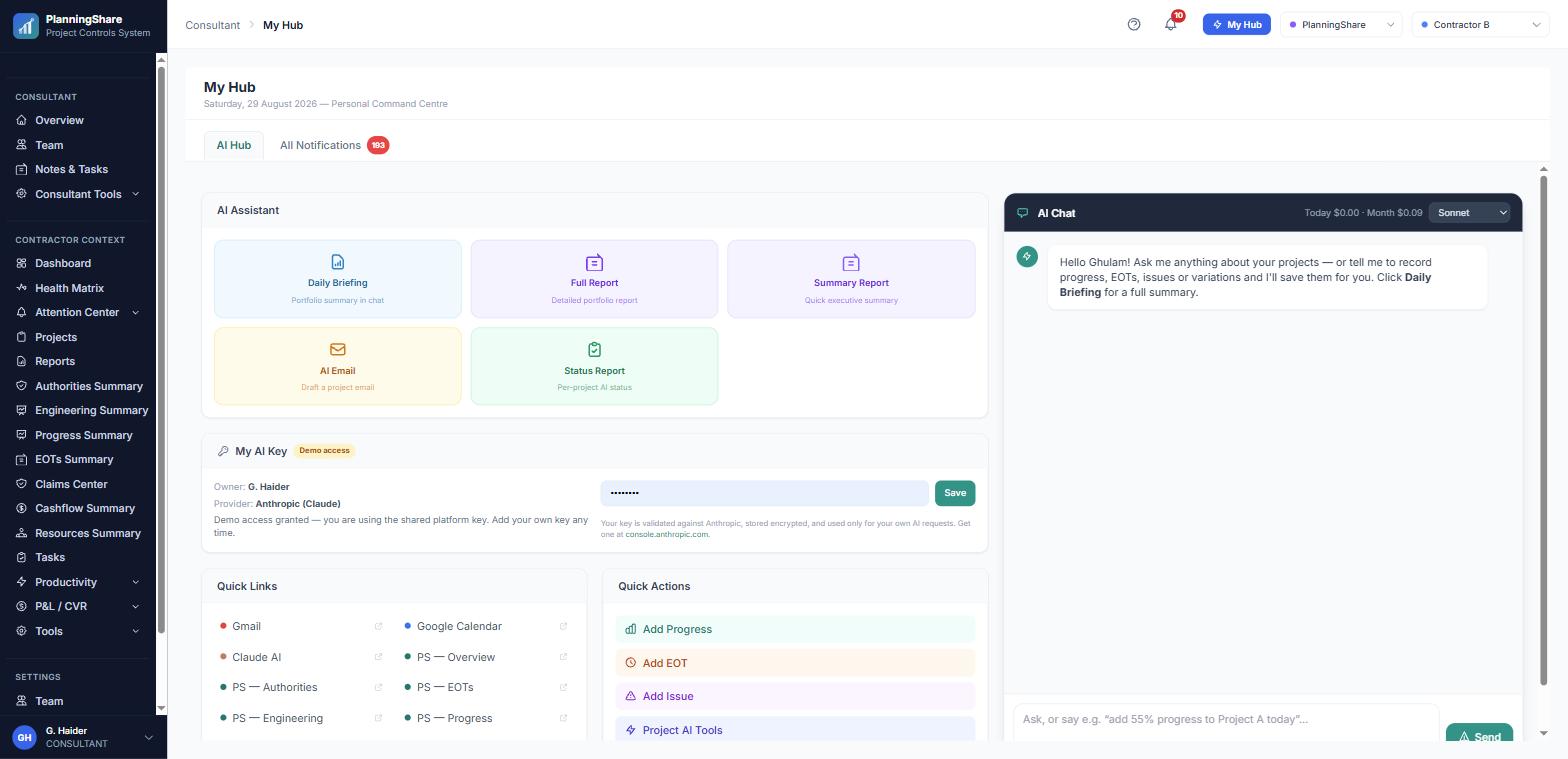
My Hub — AI assistant with daily briefing, reports and AI chat

My Hub — assistant actions and chat, live in the system.

WHO IT IS FOR

Built for the contractor’s side of the table

The people who prepare, check and defend a contractor’s position — on one internal chain: prepare, review, approve for submission, submit, then record the Engineer’s response.

Planning managers

Progress, programmes, forecast finish and the S-curve for every project — updated weekly rather than rebuilt monthly.

Contracts & claims

Delay events, notices, EOT submissions and the Engineer’s responses, with the days counted for you.

QS & commercial

Variations, cashflow, certified value and CVR in one register per project, rolled up across the company.

Site engineers

Log progress, issues, NOCs and RFIs in minutes — into the same registers head office is reading.

Head office & directors

The Health Alert Matrix, the 08:00 digest and a one-click head office report across every project.

Consultants & PMCs

Monitor several contractors at once through the same registers, alerts and summaries.

ONBOARDING

Your team live in two weeks

01

Set up

DAY 1

Your company, users, roles and projects are created for you, with contractor or consultant access configured.

02

Migrate

WEEK 1

We move your existing registers over from Excel — progress, programmes, EOTs, variations, NOCs and RFIs.

03

Go live

WEEK 2

Site and office teams trained. Attention Centre rules, the 08:00 digest and WhatsApp alerts switched on.

Stop chasing spreadsheets. See the whole portfolio.

A 30-minute live demo on one of your own projects — bring a programme and an open claim. Full product detail, plans and pricing are on the PlanningShare site.